

Getting paid to watch videos sounds like the dream side hustle. Sit back, press play, earn money. No skills required, no deadlines, no boss.
Most video reward apps pay pennies per hour. Some are outright scams. But a handful of legitimate apps offer fair compensation for your viewing time, especially when you stack them strategically.
How we tested: We tracked crediting accuracy, payout reliability, real hourly rates, and cashout friction over 60 days with 22 apps. If an app failed to credit consistently, had unrealistic payout thresholds, or showed red-flag behavior, it didn't make this list. Only 15 passed.
This guide covers the ones that were consistent, cashout-friendly, and actually worth running in the background.
Add Location Rewards to Your Stack
When you're already out (stores, restaurants, events), VISU lets you earn from verified visits by scanning partner QR codes.
Quick video. Earn your first reward.
Reality Check: What "Watching Videos for Money" Actually Means
Before diving into apps, let's set realistic expectations. These apps work because your attention has real value, but the reality is more nuanced than most guides admit.
The good news: Legitimate apps exist that pay you to watch content. Some let videos run in the background while you do other things. It's genuinely low-effort income.
The bad news: Most video apps pay $0.50 to $3.00 per hour of viewing. That's well below minimum wage. This is supplement income, not salary replacement.
The strategy: The smart approach is using video apps during otherwise dead time: commuting, waiting rooms, background while working. Don't dedicate focused hours to watching ads. Use these apps to monetize time you'd waste anyway. This is the same principle behind no-risk money making apps that pay for activities you already do. You can also earn rewards at local businesses like cafes and fitness studios while you're out.
With that context, here are the apps that actually work.
15 Legit Apps That Pay You to Watch Videos
Organized by earning potential and effort required.
Tier 1: Best Overall Value
1. VISU Network
Video type: Short brand content after scanning QR codes at partner locations.
Pay per video: Varies by campaign and location availability.
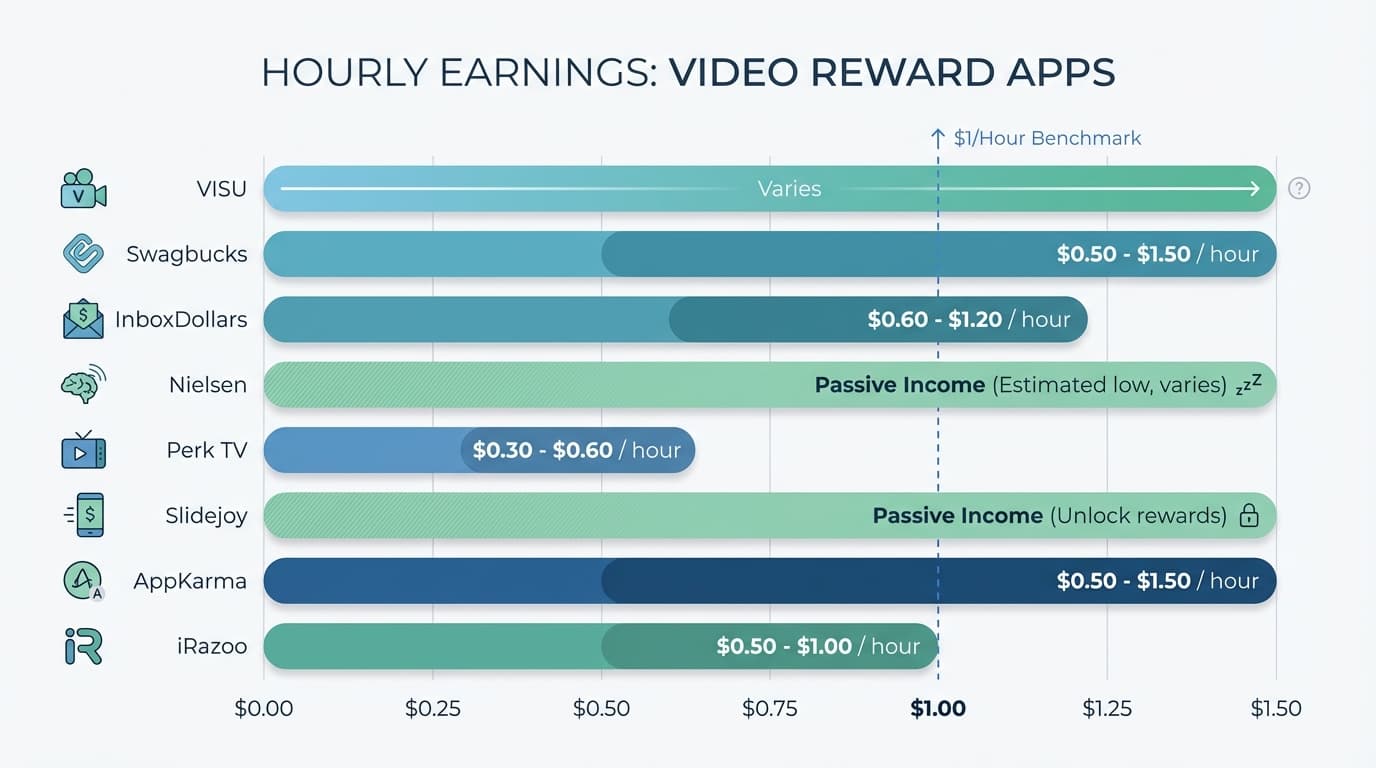
Hourly equivalent: Varies — engagement is brief (seconds, not minutes).
Payout: Rewards accumulate in-app with payout options varying by region.
How it works: You scan partner QR codes when you're already out. The value comes from verified real-world presence, which advertisers pay more for than anonymous views. Learn more about how VISU rewards work.
Why it's here: Location-verified attention is more valuable to advertisers than anonymous video views. The model pays for real-world presence, not just screen time.
Best for: People who eat out, shop, or attend events regularly.
2. Swagbucks Watch
Video type: Playlists on various topics (news, entertainment, lifestyle).
Pay per video: 1-4 SB per playlist (100 SB = $1).
Hourly equivalent: $0.50 to $1.50.
Payout: PayPal, gift cards with $3 minimum for some options.
How it works: Select a video playlist, let it play, earn points. Playlists auto-advance and you can run them in the background while doing other things. Part of the larger Swagbucks ecosystem with multiple earning methods. See our full Swagbucks review for more tips.
Why we like it: Genuinely passive. Start a playlist and forget about it.
Best for: Background earning while working or studying.
3. InboxDollars
Video type: Short clips, trailers, news segments.
Pay per video: $0.01 to $0.03 per video.
Hourly equivalent: $0.60 to $1.20.
Payout: PayPal, gift cards with $15 minimum (first payout $30).
How it works: Watch videos in the "Watch" section. Videos are grouped into playlists and completing a playlist earns bonus cents. Check our InboxDollars review for the full breakdown.
Why we like it: Pays in actual dollars, not confusing point systems. Videos are short and varied.
Best for: Users who prefer dollar amounts over points.
4. Nielsen
Video type: None required — you earn passively by having the app installed.
Pay: $50/year in gift cards plus sweepstakes entries.
Hourly equivalent: Infinite (zero active time required).
Payout: Gift cards mailed quarterly.
How it works: Install the app, let it run in background collecting anonymous usage data. That's it. While not strictly "watching videos," it's the most passive video-adjacent earning since Nielsen tracks what you watch and pays for that data.
Why it's here: Truly zero effort.
Best for: Anyone willing to share viewing habits for passive income.
Tier 2: Solid Options
5. iRazoo
Video type: Short promotional videos and trailers.
Pay per video: 1-3 points per video (3,000 points = $5).
Hourly equivalent: $0.50 to $1.00.
Payout: PayPal, gift cards with $5 minimum.
How it works: Watch videos, complete occasional surveys, earn points. Videos play automatically in sequence.
Why we like it: Lower payout threshold than many competitors with a clean interface.
Best for: Users who want quick access to rewards.
6. MyPoints
Video type: Entertainment clips, product videos, news.
Pay per video: 1-5 points per video (varying redemption rates).
Hourly equivalent: $0.40 to $0.80.
Payout: PayPal, gift cards with $10 minimum.
How it works: Watch videos in the dedicated section with bonus points for completing daily goals. Part of the Swagbucks family, so you can stack with other earning methods.
Best for: Users already in the Swagbucks ecosystem.
7. Perk TV
Video type: App trailers, movie clips, promotional content.
Pay per video: 1-2 points per video (1,000 points ≈ $1).
Hourly equivalent: $0.30 to $0.60.
Payout: Gift cards with $5 minimum.
How it works: Videos play automatically. You can run the app on an old phone or tablet dedicated to earning.
Why we like it: Truly set-and-forget.
Best for: People with spare devices to dedicate to earning.
8. Viggle (Perk)
Video type: Check in to TV shows and live content for points.
Pay per video: Varies by show popularity and watch time.
Hourly equivalent: $0.20 to $0.50.
Payout: Perk points convertible to gift cards.
How it works: "Check in" while watching TV shows you'd watch anyway and earn points for viewing time.
Why we like it: Monetizes TV you're already watching with zero extra effort.
Best for: Heavy TV watchers.
9. Slidejoy
Video type: Ads on your phone's lock screen.
Pay: $0.02 to $0.10 per day passively.
Hourly equivalent: Not applicable (passive).
Payout: PayPal, gift cards with $2 minimum.
How it works: Install the app, see ads when you unlock your phone, swipe to dismiss, earn points automatically.
Why we like it: Completely passive with ads appearing on lock screen, not interrupting your phone use.
Best for: Anyone who doesn't mind lock screen ads.
10. AppKarma
Video type: Watch ads and download apps for points.
Pay per video: 10-50 points per ad (6,000 points = $5).
Hourly equivalent: $0.50 to $1.50.
Payout: PayPal, gift cards with $5 minimum.
How it works: Watch video ads between other activities and download/try apps for bonus points.
Why we like it: Good balance of video watching and app offers with reasonable payout threshold.
Best for: Users who don't mind trying new apps.
Tier 3: Supplemental Options
11. Hideout TV
Video type: Entertainment content, viral videos, news.
Pay per video: Variable points redeemable across partner sites.
Hourly equivalent: $0.30 to $0.60.
Payout: Points transfer to Swagbucks, InboxDollars, etc.
How it works: Watch videos, earn points that transfer to your preferred reward platform. Content is more entertaining than typical ads.
Best for: Users with accounts on multiple reward platforms.
12. QuickRewards
Video type: Short promotional clips and surveys.
Pay per video: $0.01 to $0.02 per video.
Hourly equivalent: $0.40 to $0.80.
Payout: PayPal, gift cards with $5 minimum.
How it works: Watch videos in dedicated section, complete other tasks for variety.
Why we like it: Low minimum payout with straightforward interface.
Best for: Users who want simple, no-frills earning.
13. SuccessBux
Video type: Ads and promotional content.
Pay per video: $0.001 to $0.01 per video.
Hourly equivalent: $0.20 to $0.40.
Payout: PayPal with $1 minimum.
How it works: Watch ads, complete offers, earn small amounts.
Why it's here: Very low payout threshold lets you cash out quickly to verify legitimacy.
Best for: Testing with minimal time investment.
14. GrabPoints
Video type: Promotional videos and app trailers.
Pay per video: 2-10 points per video (1,000 points = $1).
Hourly equivalent: $0.30 to $0.70.
Payout: PayPal, gift cards with $3 minimum.
How it works: Watch videos, download apps, complete surveys for points.
Why we like it: Multiple earning methods prevent boredom with reasonable minimums.
Best for: Users who like variety in earning methods.
15. RewardXP
Video type: Curated video content across categories.
Pay per video: Variable XP (10,000 XP = $1).
Hourly equivalent: $0.40 to $0.80.
Payout: PayPal, crypto, gift cards with $5 minimum.
How it works: Watch videos and complete tasks to earn XP, then redeem for various rewards.
Why we like it: Crypto payout option with clean modern interface.
Best for: Users interested in crypto rewards.
Looking for more options beyond video apps? Check our complete guide to apps that pay real money for additional earning methods.
Quick Comparison: Video Reward Apps
| App | Effort Level | Hourly Rate | Min Payout | Best Feature |
|---|---|---|---|---|
| VISU | Low | Varies | Varies | Attention rewards |
| Swagbucks | Passive | $0.50-$1.50 | $3 | Background earning |
| InboxDollars | Passive | $0.60-$1.20 | $15 | Pays in dollars |
| Nielsen | Zero | Infinite (passive) | None | Most passive option |
| Perk TV | Zero | $0.30-$0.60 | $5 | Run on old device |
| Slidejoy | Zero | Passive | $2 | Lock screen earning |
| AppKarma | Low | $0.50-$1.50 | $5 | App offers bonus |
| iRazoo | Low | $0.50-$1.00 | $5 | Low threshold |
How to Maximize Video Watching Earnings
Beyond video watching, you can stack other low-effort methods like getting paid to walk or visiting stores for a complete passive income strategy.
Stack multiple apps
Use location-based reward apps when you're out, Swagbucks Watch for background playlists, Nielsen for passive data sharing, and Slidejoy for lock screen income.
You can also stack cashback apps for purchases you'd make anyway. Different mechanisms, no conflicts, combined earnings.
Dedicate an old device
Apps like Perk TV can run continuously on an old phone or tablet. Plug it in, connect to WiFi, let it earn 24/7. Some users run multiple devices for maximum passive income.
Use dead time strategically
Waiting at the doctor's office? Run video playlists. Commuting on public transit? Let Swagbucks play. Turn wasted time into earning time.
Don't watch actively
The math doesn't work for focused watching. $1/hour isn't worth dedicated attention. These apps work best as background or secondary activities.
Combine with other earning methods
Video watching alone won't generate significant income. Pair it with receipt scanning, location rewards, and surveys for a complete earning stack.
If you prefer games over videos, check out apps that pay to play games for similar low-effort earning.
See our guide on passive income apps for the full strategy.
Track your actual hourly rate
Calculate what you're actually earning per hour of attention. If an app pays less than $0.50/hour of active time, it's not worth it unless you can run it passively.
Sample Earning Setup: $50-$100/Month from Videos
Here's a realistic multi-app strategy for maximizing video earnings:
Always running (passive)
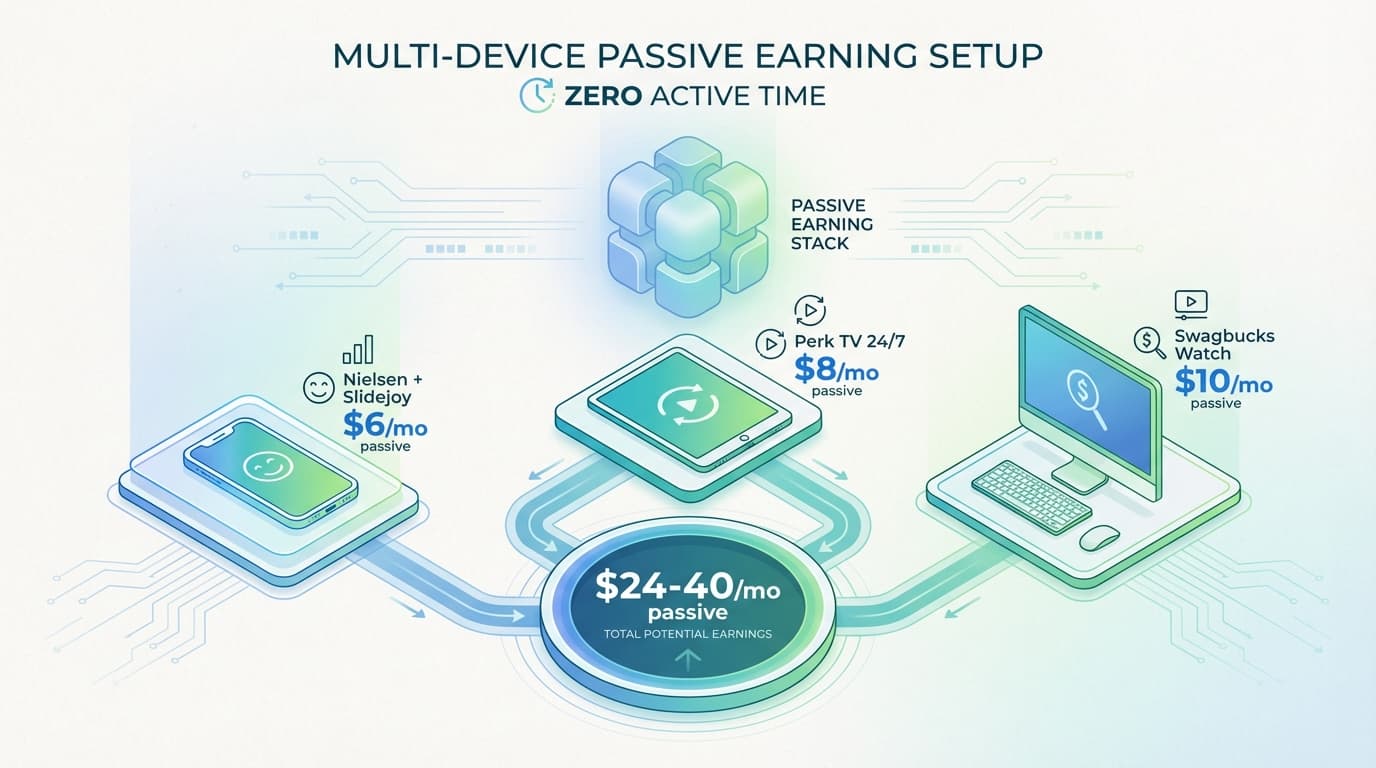
Nielsen Panel on main phone earns approximately $4/month.
Slidejoy on lock screen adds around $2/month.
Perk TV on an old tablet contributes roughly $8/month.
Total passive: $14/month with zero active effort.
Background during work/study
Swagbucks Watch playlists can earn around $10/month.
InboxDollars videos add approximately $5/month.
This requires minimal attention — just start the playlist and let it run.
Location-based (when available)
Location reward apps like VISU vary by area and partner availability, but can add $10-30/month for users in active areas.
Total potential
$29-$40/month passive, plus variable location rewards.
Add surveys, receipt scanning, and other methods from the same platforms to push toward $100+/month.
For faster payouts, see apps that pay instantly to PayPal.
Video Apps to Avoid
We tested several apps that didn't make the cut. Here's what to watch out for.
Apps that crash constantly: Several video apps freeze, crash, or fail to credit views. Not worth the frustration.
Apps with unreachable minimums: Some apps require $50+ to cash out while paying fractions of a cent per video. You'll never reach payout.
Apps with more ads than rewards: Ironic but true — some video reward apps show you ads to watch ads, and the meta-ads don't pay.
Apps that drain battery excessively: If an app kills your battery in 2 hours while paying $0.10, the electricity cost exceeds earnings.
Apps requiring constant interaction: Some apps pause every 30 seconds requiring you to click. That's not passive — that's a low-paying job.
Add Location Rewards to Your Earning Stack
VISU rewards verified visits at partner locations. If there are active partners near you, you can start earning right away.
Quick video. Earn your first reward.
FAQ: Get Paid to Watch Videos
Can you really get paid to watch videos?
Yes, but earnings are modest. Most video apps pay $0.50 to $2.00 per hour of viewing.
The best strategy is running videos passively in the background or combining with location-based reward apps for variety.
Which app pays the most for watching videos?
For passive video watching, Swagbucks and InboxDollars offer the best balance of earnings and reliability.
Location-based reward apps can offer higher effective rates because engagement is brief (seconds vs. minutes), but availability varies by area.
Can I run video apps in the background?
Yes, several apps allow background play.
Swagbucks Watch, Perk TV, and InboxDollars can run while you do other things. Some users dedicate old phones or tablets to run these apps 24/7.
How much can I realistically earn watching videos?
With a strategic multi-app approach, $50-$100/month is realistic.
Passive-only methods (Nielsen, Slidejoy, Perk TV on spare device) earn $15-$25. Adding surveys, receipts, and location rewards pushes earnings higher.
Are video reward apps worth my time?
Only if you use them passively or during otherwise wasted time.
Don't sit and actively watch for $1/hour. Do run playlists in the background while working, commuting, or waiting.
The value is in monetizing dead time, not replacing productive time.
Do I need multiple devices?
Not required, but helpful.
Many users run Perk TV on an old phone or tablet dedicated to earning. This maximizes passive income without affecting your primary device's battery or performance.